Denial of Wallet: When Your AI Product Becomes Its Own Economic Attack Surface
AI Security & Adversarial Architecture, Track Item S6 · Architecture of Proof
What This Means for Your Roadmap
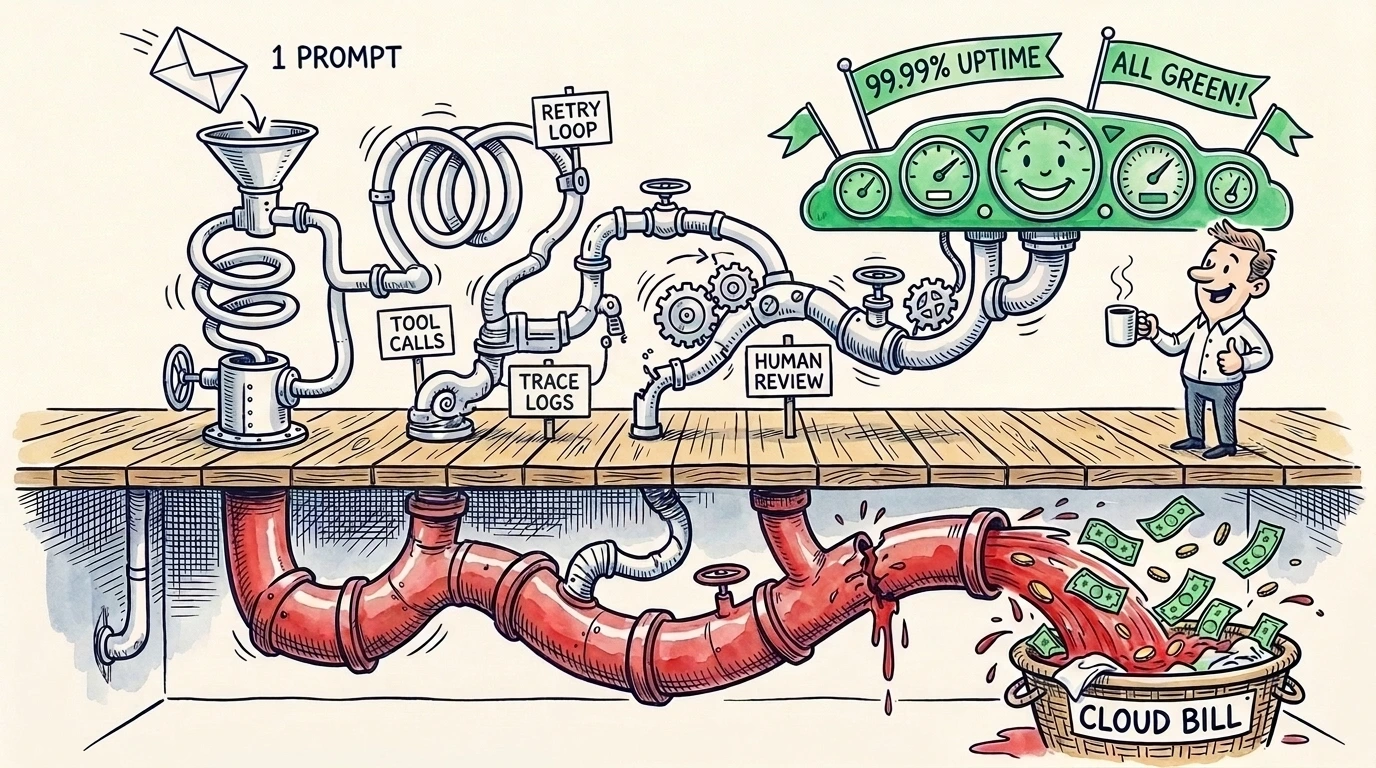
- Add spending caps alongside traffic limits. Blocking high request volume protects your servers, but it misses a single prompt that runs 20 tool steps, writes megabytes of traces, and sends a case to a \$15 human review queue.
- Screen automated triggers before waking up the agent. If your agent responds automatically to incoming support emails or customer webhooks, filter out duplicates and sender floods with cheap rules first so outside traffic cannot launch expensive loops.
- Degrade gracefully and fail safely. When a user nears a spend limit, switch to a cheaper model or turn off optional tools before throwing an error. When a human review queue hits its cap, pause the job instead of letting unresolved cases auto-approve.
1. Why Engineering Alarms Miss Economic Attacks
In a traditional denial-of-service attack, your alerts fire within minutes because traffic knocks the site offline. With an AI agent, you can take an expensive hit without tripping a single engineering alarm. A small batch of valid requests triggers long reasoning loops, paid third-party API calls, heavy trace storage, and manual review tickets. Every request returns a normal response, so on-call engineers see nothing wrong until finance opens the monthly invoice.
Security teams call deliberate versions of this Denial of Wallet (DoW), a term that began in pay-per-use serverless cloud systems. The goal is to run up your metered bills until operating the feature becomes financially painful. You do not need a malicious attacker to hit the same wall, either. A customer's broken webhook or a messy batch backfill will create the exact same invoice shock whenever a product lacks a hard spending ceiling.
In most conventional web software, one API call maps to a fairly narrow band of server work, so request count gives you a decent rough proxy for cost. Agentic endpoints break that link. Here, one short prompt might finish in a single cheap model call, while the next request to the exact same endpoint could kick off a long workflow touching five different budgets:
| Where the money goes | What happens during a single long run |
|---|---|
| Model calls | Input, output, and internal thinking tokens across multiple turns |
| Growing context | Re-sending the expanding conversation and tool outputs on every turn |
| External tools | Paid search, data enrichment, code sandboxes, and partner APIs |
| Logging and traces | Sending large intermediate payloads into monitoring and audit platforms |
| Human review | Staff time spent checking uncertain or escalated cases |
Because request count no longer predicts resource burn, tracking spend velocity matters regardless of who caused it. Whether you are dealing with an attacker or a customer accident, product leadership has to answer the same practical question: how much money can one request spend, and what stops it when it goes too far?
Why Enterprise SSO Does Not Protect B2B Products
B2B product leaders often assume Denial of Wallet is mostly a consumer problem caused by bots or free-trial abuse. Sitting behind enterprise SSO helps, but enterprise agents still have several exposed entry points:
- Outside emails and uploads (second-order DoW). Even if your employees log in through SSO, your agent probably reads things sent in from outside the company, like customer support emails or vendor invoices. Nobody needs a password to trigger that workflow. If someone sends 500 messy dispute emails to a customer's support address, your agent will pick them up, chew through 20 reasoning steps on each one, and send the hard ones to your human review queue. On a flat-rate subscription, your company eats that extra cost directly. Even if the customer pays per token or uses their own API key, they still get stuck with a surprise bill and usually blame your product for letting it happen.
- Broken customer integrations. A paying enterprise customer hooks up a buggy webhook or runs a 2 AM backfill of 10,000 old, messy records. Because every call is authenticated and legitimate, standard access controls let the retry loops run all night.
- Expensive specialist queues. In B2B areas like underwriting, legal review, compliance, or billing disputes, manual review is staffed by expensive specialists. When an inbound spike floods that queue, you take a hit from both labor overhead and missed customer SLAs.
- Compromised logins on flat seat plans. When an enterprise buys flat per-seat licenses, a single phished employee account or a script hooked up by a power user can run deep reasoning and paid enrichment tools non-stop for a fixed monthly fee.
2. Four Ways Ordinary Agent Features Run Up the Bill
Most of these cost leaks happen without any software bug or clever hack. They come straight out of helpful features shipped without spending limits. (All dollar figures, step counts, and thresholds below are illustrative examples; real limits need to be tuned to your own task margins and error costs.)
1. Making the Model Overthink
Back in 2020, Ilia Shumailov and colleagues (Sponge Examples) showed that crafted inputs can force neural networks into worst-case compute latency without causing obvious errors. Reasoning models make that problem much bigger because they bill for hidden thinking tokens before giving an answer.
In OverThink: Slowdown Attacks on Reasoning LLMs (Kumar et al., 2025), researchers embedded harmless-looking logic puzzles inside public web pages and code READMEs that reasoning agents read. The models still gave the right final answer, so end users saw nothing wrong and safety filters never fired, yet reasoning token usage jumped 12x to 46x on standard benchmarks and up to 17x on coding agents. Without a hard cap on thinking tokens for untrusted inputs, someone else's text ends up controlling your inference bill.
2. Stalled Loops and Snowballing Context
Agents are useful because they can call tools, check what came back, and try again when something is incomplete. That same loop is easy to keep running in circles. Any input that triggers partial tool errors or leaves the agent slightly short of its completion check will keep it retrying right up to the maximum step cap.
As we worked through in Autonomy Is a Cost Multiplier, resending a growing history on every turn compounds input tokens quickly. Suppose an agent starts with 2,000 tokens, adds 1,500 tokens of tool results on each turn, and runs 20 steps. Instead of processing 40,000 input tokens, it sends 325,000 input tokens across the run, roughly 8.1x as much (the exact formula is in the Appendix). Prompt caching cuts the bill on repeated prefixes, which helps a lot, though you still pay for cache reads, newly added tokens, and output generation. When you write a retry limit into a PRD, you are also setting a spending ceiling.
3. Paid Tool Calls and Heavy Tracing
Model inference is often only part of the bill. A stuck workflow might also run paid search or data-enrichment APIs and write full intermediate payloads into your logging vendor. As we covered in The Inversion: When Assuring an AI Agent Costs More Than Running It, storing every step by default turns routine debugging into a real variable cost when loops drag on.
4. Flooding the Human Review Queue
In workflows where specialists review uncertain outputs, human escalation can quickly outweigh compute costs. Say your operations team averages \$15 per manual review once staff time and overhead are counted. If 500 deliberately ambiguous cases land below your auto-approval cutoff, that creates \$7,500 in review exposure (500 × \$15) if your team works every case. Often the worse business problem is SLA slippage: real, urgent customer issues sit stuck at the back of the queue behind junk traffic, causing missed contractual deadlines even when the model never makes a bad autonomous decision.
3. Why Standard Defenses Miss This
Your existing security stack still has a job to do, but three gaps leave agentic workflows open to spend spikes:
- HTTP rate limits only count requests. Letting an account send 10 requests per minute looks conservative at the gateway, even if each request spawns 20 agent turns and hundreds of thousands of tokens.
- Safety filters only look for bad content. Moderation tools and prompt-injection checks flag toxic text or obvious rule overrides. As the OverThink study showed, a document that drains your compute budget can look completely normal.
- Pay-per-token APIs keep running until you stop them. Hosted model providers give generous default quotas, and your own app servers scale up to handle valid incoming traffic. Nothing in the stack pauses an unprofitable loop until an internal spend alert or limit triggers.
4. Five Guardrails Product Leaders Should Ask Engineering For
To keep margins predictable, your team needs to control how much spend any single user or inbound channel can trigger, not just whether they are allowed to log in.
1. Enforce Practical Spending Caps and Degrade Before Crashing
You do not need twenty real-time counters to protect margins. Convert model tokens and paid tool calls into one estimated dollar counter using a simple internal price table (most AI gateways or a standard Redis sliding window handle this out of the box), and enforce it at three practical levels:
- Per run (inside the agent loop): Cap steps, paid tool calls, and estimated run cost in memory (~50 lines of code).
- Per user or external sender (short rolling window): Enforce a 15-minute or hourly cap to catch speed spikes. A customer spending \$100 across a whole month is normal, whereas spending \$100 in three minutes needs an automatic slowdown.
- Per customer tenant (daily and monthly): Cap total account spend to protect fixed-contract margins, backed by organization-wide hard caps set directly in your model provider's billing console.
Keep enforcement separate from observability. Observability tools collect metrics after each call and page an engineer minutes later, which is too slow for a burst burning \$100 every three minutes. Your AI gateway or Redis counter has to sit inline on the request path to enforce the slowdown immediately, while observability tells your team afterward whether to block an attacker or call a customer whose webhook broke. Leave trace storage out of that real-time counter too: because logs ingest asynchronously, it is much simpler to cap trace costs directly at the logger by truncating large tool payloads on routine runs.
One concurrency detail is worth checking during architecture reviews: checking a balance without holding it fails under parallel traffic. If ten requests arrive at the same second, all ten see remaining budget and blow past the limit together. For busy tenants, engineering should estimate and put a short-lived hold on the next step's cost (counting known input tokens, a tight per-call output cap, and tool fees) before calling the model, then settle the actual cost once the step finishes and release what was not used. (Give holds a quick timeout so crashed workers do not lock up budget, use idempotency keys so retries do not double-hold, and remember that work already in flight can still leave minor overrun.)
When a run gets close to its cap, avoid dropping the user straight onto an error page. Step down gracefully first: switch to a cheaper, faster model without deep reasoning or turn off optional paid tools before stopping the task outright.
2. Separate Caller Trust From Workflow Cost
Logged-in enterprise users and unverified outside senders should not go through the same door:
| Who or what is calling | Illustrative entry and spending policy |
|---|---|
| Unverified outside inbox (support emails, claim uploads, webhooks) | Run cheap triage and duplicate filtering first; throttle by sender and domain before starting an agent loop |
| Anonymous web visitor | Lightweight model, no paid external tools, very short step cap |
| Free trial account | Limited tool list, tight hourly spend caps, pause or defer manual escalations |
| Paid individual user | Standard step cap with a metered allowance for harder tasks |
| Enterprise tenant | Configurable tenant budgets, approved integrations, and automated spend alerts |
Keep workflow complexity separate from who is logged in. Even for a paying enterprise customer, expensive multi-step tasks should unlock extended budgets only after an upfront routing check confirms the task actually needs it.
3. Cut Off Loops That Stop Making Progress
A hard step cap is a useful backstop, though you want to catch stalled runs much earlier. Have engineering check whether each turn actually changes the state of the task. If the agent hits the same tool error twice in a row or keeps pulling duplicate search results with the same arguments, stop the loop and return a short explanation of what got stuck (see the Appendix for the five loop checks engineering can build in plain code).
4. Put Safe Limits on Human Escalation
Set rolling escalation caps per sender, user, and tenant. Cluster duplicate ambiguous tickets into a single review item, and prioritize the human queue by consequence, urgency, and contractual SLAs.
Just as important is what happens when the queue cap trips: pause or defer the workflow, ask the user for missing information, or temporarily restrict the feature. Never treat a busy or capped review queue as permission to auto-approve a consequential action.
5. Trim Debug Bloat Without Losing Your Audit Trail
Set payload size caps on routine debugging traces and sample low-risk runs, while keeping full retention for regulated workflows (Customer-Facing Proof). You can shrink storage bills substantially without dropping the minimum accountability record: who authorized the run, which budget applied, which actions executed, why it stopped, and what it cost.
5. Put It in the PRD, the Runbook, and Your Pricing
Most PRDs spell out what an agent should accomplish and which tools it can call, while leaving out how much money a single attempt is allowed to spend. Compare these two specs:
- Open-ended PRD: "The agent investigates the billing dispute using available tools and keeps iterating until it has a solid answer."
- Budgeted PRD: "The agent investigates the dispute within an illustrative \$0.25 run budget and a tight default step cap (extended only after complexity routing), stops immediately after two identical tool errors, and returns its partial findings with a clear request for missing details if the budget runs out."
Before engineering starts building an autonomous feature, make sure the PRD answers four questions:
- What is the maximum dollar, token, and human-review exposure one run or external sender can trigger?
- Which step-downs or no-progress checks fire before hitting the hard ceiling?
- What does the customer see when a run slows down or halts? (Showing what the agent already found and asking the user for the missing piece works much better than throwing a generic timeout error.)
- Which real-time internal alerts and kill switches stop runaway spend before delayed provider bills show up?
Pair the PRD with a simple triage runbook for operations: block and revoke credentials when you confirm malicious abuse, but throttle and call the customer's admin when a paying enterprise account triggers an accidental flood from a broken webhook. On your product dashboard, track cost per successful task, cost per failed task, retry overhead, and how often users hit budget caps right alongside uptime.
Finally, make sure your pricing matches your risk (AI Is Turning Software Into a Variable Cost of Execution). Flat per-seat pricing and wide-open free trials give customers predictable invoices while leaving your business on the hook for worst-case runs. Before rolling out deep autonomy on a fixed subscription, model what happens to your margins if 5% of accounts hit max depth every day or an inbound inbox gets flooded, and backstop that exposure with tiered allowances, customer-set spend caps, or usage overages.
The Adversarial Stress-Test: Five Critical Inquiries
1. What is the strongest argument against tight spending caps?
- The Objection: "Strict run budgets and early loop kills will cut off legitimate, hard enterprise tasks right before they finish, hurting product quality."
- The Practical Resolution: Step down gracefully (cheaper models, fewer optional tools) and show clear partial results rather than throwing a dead error, and reserve tight caps for routine or unverified traffic while letting enterprise tenants set higher budgets for complex workflows.
2. Under what circumstances would this fail?
- Low-and-slow spread-out abuse (Sybil attacks). Someone spinning up hundreds of throwaway free trials (or sending disputes from hundreds of separate email domains into a B2B support inbox) can stay beneath every per-sender cap.
- The Practical Resolution: Back up per-sender throttles with tenant-level and platform-wide spend-velocity breakers, cheap pre-agent duplicate filtering on outside inboxes, and anomaly alerts across newly created accounts.
3. What would a skeptical growth or sales leader object to?
- The Objection: "Locking down free trials takes away our best product demo and hurts signups."
- The Practical Resolution: Run free-trial workflows on curated, pre-cached sandbox data with mocked external tools. Prospects still experience the real workflow while substantially reducing your exposure to live metered bills.
4. Which alternative deserves more consideration?
- Customer-owned API keys (BYOK) and pass-through billing.
- The Practical Resolution: Customer-owned keys can shift directly billed model charges to the customer, though they still do not protect your orchestration servers, trace storage, or vendor-staffed review queues, and customers will still hold your team responsible if a runaway loop blows up their cloud account. Spending breakers still belong in the product.
5. What am I assuming that may not be true?
- That pre-step cost holds are easy to size accurately for reasoning models. Holding worst-case output limits on every turn can tie up too much budget and slow down legitimate parallel users.
- The Practical Resolution: Set tight, task-specific output and thinking limits per call, keep hold timeouts short, and settle actual usage right after each turn so unused budget returns to the pool within seconds.
The Monday Proof Question
"If a single free-trial user, compromised enterprise login, or flooded support inbox sent 500 ambiguous, worst-case tasks to our flagship agent tonight, how many dollars in model calls, tools, logs, and human review exposure would pile up, and how many minutes would pass before an automated circuit breaker stopped it?"
One-Line Synthesis
An AI agent can spend real money on compute, tools, and staff time on your behalf, so every autonomous workflow needs hard spending caps, inbound-channel limits, and safe stop rules built directly into the product.
Appendix: Engineering Reference
1. Input-Token Math for Stalled Loops
If an agent starts with a complete first-call input of $T_0$ tokens and adds an average of $\Delta$ tokens of retained and resent material (tool results, prior outputs) on each of $N$ steps ($i = 0 \dots N-1$), cumulative input tokens follow:
$$ \begin{aligned} T_{\text{input}}(N) &= \sum_{i=0}^{N-1} (T_0 + i\Delta) \\ &= N \cdot T_0 + \frac{\Delta \cdot N(N - 1)}{2} \end{aligned} $$
At $T_0 = 2,000$, $\Delta = 1,500$, and $N = 20$: $(20 \times 2,000) + (1,500 \times 190) = 40,000 + 285,000 = 325,000$ input tokens (versus $40,000$ with no history growth).
2. How Engineering Catches Stalled Runs and Long Loops
Engineers catch stalled loops using plain, zero-cost checks inside the orchestration loop rather than running a second model to watch the first one:
- Duplicate tool-call check: Keep a list of
(tool_name, arguments)called during the current run. If the agent asks to runlookup_invoice(id="402")a second time with the same inputs, block the repeat call and stop the run after two duplicates. - Consecutive error counter: Track the error code returned by each tool (
403 Forbidden,404 Not Found, schema validation error). If the agent hits the same error twice in a row, or three errors total, stop the run immediately. An agent that getsPermission Deniedon step 2 is not going to fix it on step 12. - Ping-pong cycle check: Sometimes an agent alternates between two or three steps instead of repeating one call back-to-back (
search_docs -> check_policy -> failed -> search_docs -> check_policy -> failed). Storing a short history of recent(tool_name, result_hash)pairs catches repeating cycles immediately. - No-new-information check: Track what new facts entered the run, such as the list of retrieved document IDs or the structured JSON fields populated so far. If two turns in a row add zero new document IDs and leave the draft state unchanged, exit early.
- Hard backstops: Pair the checks above with three blunt ceilings: a max step count, a wall-clock timeout (for example, 45 seconds total), and a cumulative token cap in case one tool returns a huge payload early in the run.
Key Rule for PMs: Make sure engineering runs these checks with plain code (hashes and counters that take microseconds and cost \$0), never by calling a second LLM on every turn to ask "Does this agent look stuck?"
Sourcing & Verification Ledger
Evidence tags: [E] published external standard or security research, [I] author synthesis or illustrative scenario model, [V] analytical identity under stated assumptions.
| Claim / Framework | Tag | Source and Caveat |
|---|---|---|
| Unbounded Consumption & Denial of Wallet as a top LLM application risk | [E] | OWASP Foundation, OWASP Top 10 for Large Language Model Applications (2025), LLM10:2025 Unbounded Consumption. Formalizes pay-per-token DoW, resource depletion, and runaway agent loops. |
| OverThink reasoning-token amplification (12x–46x on benchmarks; up to 17x on coding agents via untrusted context decoys) | [E] | Abhinav Kumar et al., "OverThink: Slowdown Attacks on Reasoning LLMs" (arXiv:2502.02542, 2025). Tested across o1, o3-mini, and DeepSeek-R1 using benign-looking injected puzzles; exact multipliers vary by model and task. |
| Sponge Examples (crafted inputs maximizing neural network compute latency and energy) | [E] | Ilia Shumailov et al., "Sponge Examples: Energy-Latency Attacks on Neural Networks" (arXiv:2006.03463, 2020 / IEEE EuroS&P 2021). Foundational ML energy-latency attack literature. |
| Quadratic input-token growth (325,000 vs. 40,000 tokens at $T_0=2,000, \Delta=1,500, N=20$) | [V] | Analytical identity under stated assumptions ($i = 0 \dots N-1$). Models cumulative retained input tokens only; actual bills depend on prompt caching, truncation, and provider pricing. |
| Human review exposure (500 ambiguous cases × \$15/case = \$7,500) | [I] | Illustrative exposure if all 500 cases are worked at \$15/case; not an empirical benchmark. Actual review costs and SLA impacts vary by workflow. |
| Hold-before-run budgets, inbound-channel gates, safe queue overflow rules, and budgeted PRD template | [I] | Author's synthesis of product, FinOps, and security controls. All numerical thresholds (\$0.25, \$100, 2 errors) are illustrative and must be calibrated to task economics. |
Subscribe to the Architecture of Proof Dispatch
Rigorous, decision-forcing systems engineering and AI governance monographs for technical leaders. Delivered periodically, zero spam.