AI Audit Trails: Replayable AI for High-Stakes Systems | AI Governance
This post is part of the Decision Traceability pillar.
Explainability provides retrospective intuition; replayability produces forensically admissible evidence. While explainable AI techniques attempt to demystify neural network representations in the moment, they fail regulatory audits because they cannot reconstruct the exact machine state, input features, and policy configurations that governed a disputed historical transaction.
Deterministic replayability requires an immutable audit trail: capturing the full decision-time payload, evaluated business rules, model checkpoint digests, and operator overrides so that any past action can be reproduced in an isolated sandbox with bit-level fidelity.
How Do You Design an AI System for Bit-Level Replayability?
Replayability separates governed production architectures from speculative prototypes. An auditable deployment allows engineers, risk officers, and external examiners to feed historical inputs into an isolated execution runtime and verify that the system generates the identical decision path.
Achieving this requires recording three independent operational axes at the millisecond of execution: - Input Invariant Snapshots: The normalized feature vectors and external API payloads observed by the system. - Rule Hierarchy Evaluations: The Boolean status of every deterministic eligibility, risk, and compliance constraint. - Model Inference Provenance: The exact model checkpoint hash, hyperparameter weights, and raw logit distribution.
The End-to-End Decision Timeline
The Decision Assembler Flow orchestrates deterministic compliance rules, probabilistic scoring models, and human oversight into an immutable evidentiary record:
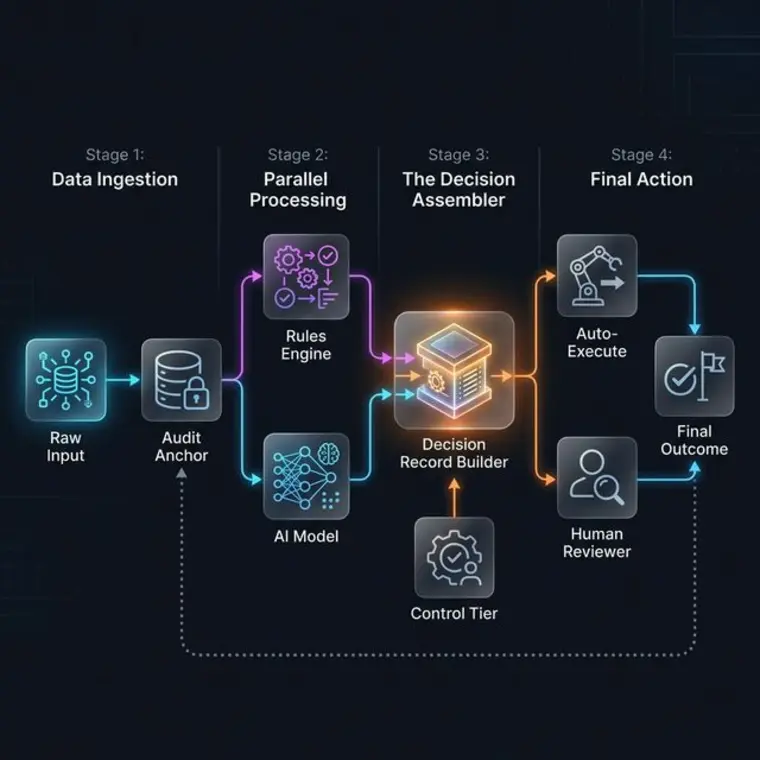
The Audit Note: Every stage of the timeline is cryptographically linked to its predecessor, forming an append-only chain of custody that guarantees retrospective reproducibility in an isolated test environment.
Decision Log Record Anatomy
A production audit trail relies on structured Decision Records that serialize boundary telemetry into a standardized schema:
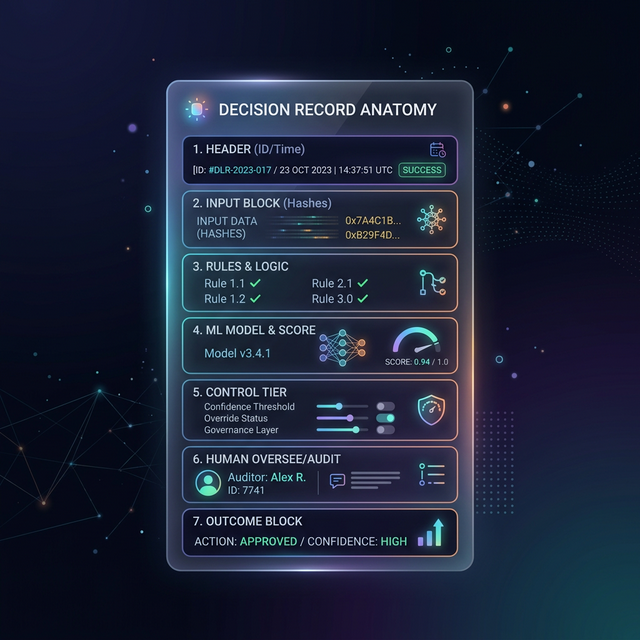
A robust audit architecture enforces a strict two-layer storage decoupling:
- The Audit Ledger: Stores compact queryable metadata, execution timestamps, rule evaluation results, model checkpoint hashes, and a content-addressed SHA-256 digest referencing the raw payload.
- The Encrypted Payload Store: Houses the complete, serialized input features, external API responses, and intermediate embeddings in write-once, tamper-evident object storage (such as AWS S3 Object Lock).
During standard operational queries, compliance personnel search the lightweight Audit Ledger in milliseconds. When a formal subpoena or algorithmic investigation demands forensic reconstruction, engineers retrieve the full payload using the reference key, verify the cryptographic hash against the ledger to prove zero tampering, and inject the state into the replay engine.
Decision Record Framework
| Component | Technical Content | Governance Purpose |
|---|---|---|
| Header | Decision ID, UTC Timestamp, Logic Version Hash | Anchors the transaction immutably in time and pipeline lineage. |
| Input Block | Filtered indexed fields + SHA-256 Digest + Payload Reference URI | Enables high-speed query indexing while securing complete raw feature vectors. |
| Rules Block | Evaluated rule identifiers, Boolean flags, threshold bounds | Demonstrates deterministic compliance prior to probabilistic scoring. |
| Model Block | Checkpoint ID, runtime temperature, raw logits, calibrated score | Documents exact inference conditions and model behavioral certainty. |
| Control Tier | Active operational tier (0–3), execution authority token | Proves authorized level of autonomy at the millisecond of execution. |
| Human Block | Reviewer public key, override category code, signed justification | Enforces personal fiduciary accountability for manual adjudications. |
Concrete Production Record Implementation
{
  "decision_id": "dr-20260315-A7821",
  "timestamp": "2026-03-15T14:23:01.812Z",
  "pipeline_version": "v4.2.1-prod",
  "indexed_attributes": {
    "loan_amount": 15000,
    "credit_score_bucket": "650-700",
    "jurisdiction": "TX",
    "adjudication_status": "DECLINED"
  },
  "control_tier": 2,
  "payload_sha256": "a3f8b2c1d4e5f609123456789abcdef0123456789abcdef0123456789abcdef0",
  "payload_ref_uri": "s3-locked://audit-vault/2026/03/A7821.parquet",
  "rule_evaluations": {
    "RULE_SANCTIONS_CHECK": true,
    "RULE_DEBT_RATIO_CEILING": true,
    "RULE_MINIMUM_RESERVES": false
  },
  "model_telemetry": {
    "model_id": "risk-scoring-ensemble",
    "checkpoint_hash": "c8e2b7a1",
    "calibrated_score": 0.412,
    "decision_threshold": 0.650
  }
}
Filtering primary search dimensions into indexed_attributes enables sub-second compliance aggregations across billions of rows without incurring the cost or privacy liability of hydrating raw S3 object payloads.
Infrastructure Logs vs. Decision Logs
Organizations often confuse operational telemetry with audit logs. Infrastructure metrics monitor whether services were alive; decision logs prove whether outcomes were defensible:
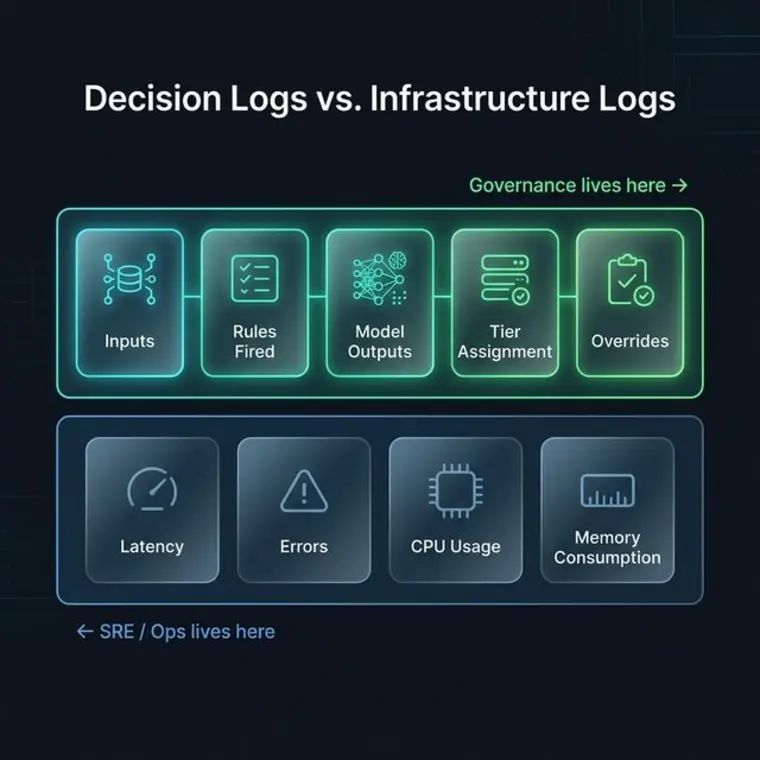
| Dimension | Infrastructure Telemetry | AI Decision Logs |
|---|---|---|
| Target Audience | SRE, DevOps, Platform Engineers | Model Risk Officers, Regulators, Internal Auditors |
| Primary Inquiries | Did the pod crash? What was P99 latency? | Which rule triggered? Was the credit denial legally compliant? |
| Retention Window | 14 to 30 days (ephemeral hot storage) | 3 to 7 years (statutory regulatory retention) |
| Immutability Requirement | Low (logs can be sampled, rotated, truncated) | Absolute (cryptographically signed, append-only ledger) |
The PM's AI Audit Trail & Replay Readiness Matrix: Defending Decision Integrity
When internal audit, enterprise customers, or regulatory examiners request proof of an automated AI decision, product managers cannot rely on standard engineering APM dashboards.
Use this readiness matrix in your architecture and sprint reviews to verify that audit trails are legally and operationally defensible:
| Audit Dimension | What Engineering Typically Logs | Why It Breaks in a Formal Audit | What the PM Must Mandate in the PRD |
|---|---|---|---|
| Input Feature Capture | Raw JSON request logged in ephemeral Datadog/CloudWatch streams. | Logs are truncated, sampled, or purged after 30 days; PII scrubbing obscures causal features. | Two-Layer Decoupling: Store queryable metadata in audit ledger and full encrypted raw payload in S3 Object Lock with individual crypto-shredding keys. |
| Rule & Guardrail State | Unversioned boolean flags scattered across distributed microservices. | Impossible to prove which business rules fired in what order during historical execution. | Immutable Rule Manifest: Ordered Boolean array capturing rule IDs, evaluated parameters, and policy version hashes embedded in the trace header. |
| Model & Prompt Lineage | Generic model name (e.g., gpt-4o or risk-v1) without checkpoint hashes. |
Cloud API providers update models behind static endpoints; internal prompts drift without git hashes. | Cryptographic Lineage Digest: Store immutable SHA-256 hashes of model weights, system prompts, retrieval chunk IDs, and random seeds. |
| Human Override Attribution | Generic database update timestamp showing status changed from 'Pending' to 'Approved'. | Fails fiduciary standards; cannot prove who approved it, what they saw, or why they overrode the AI. | Human Context Payload: Record reviewer ID, UI viewport snapshot, dwell time, and mandatory structured categorical reason code. |
| Longitudinal Outcome Linkage | Transaction logged at runtime, but subsequent default or chargeback is recorded in a separate database. | Disconnects inference from real-world performance; prevents continuous calibration and retraining. | Asynchronous Outcome Webhook: Append lifecycle outcome IDs (e.g., charge-off, dispute, reversal) back to the original Decision Record ID. |
Designing for Deterministic Replayability
Deterministic replay requires decoupling runtime state from external dependencies. A Replay Engine ingests the recorded decision payload, retrieves the exact model checkpoint from the immutable model registry, and re-executes inference within a containerized sandbox:
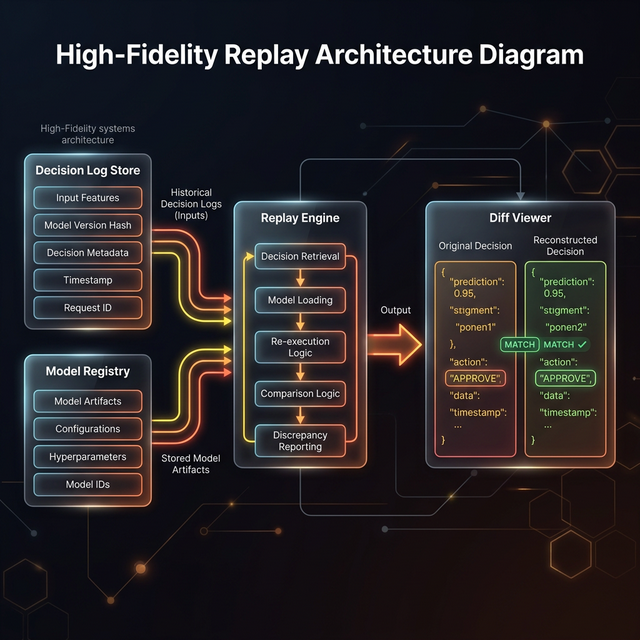
If a re-executed inference produces a divergent score or trips alternate rules, the audit pipeline flags non-determinism, identifying unauthorized configuration drift or unpinned runtime dependencies.
Storage Planning and Lifecycle Tiering
Audit storage scales across two divergent curves: lightweight metadata ledgers and high-volume payload archives:
1. Metadata Ledger Storage Profile
- Average record size: 1.2 KB.
- 100,000 decisions daily generates ~43 GB uncompressed per year.
- Compressed into columnar Parquet format, hot query storage requires less than 8 GB annually, making multi-year operational queries inexpensive.
2. Payload Vault Storage Profile
- Average multi-modal or document payload: 50 KB to 250 KB.
- 100,000 decisions daily generates 1.8 TB to 9.0 TB annually.
- Mitigated via automated cloud lifecycle transitions:
- Hot (0–30 Days): High-speed operational database for live exception triage.
- Warm (31–365 Days): Columnar data lake (S3/Athena) for periodic regulatory sampling.
- Cold (1–7 Years): S3 Glacier Deep Archive with Object Lock compliance mode for tamper-proof statutory retention.
The Adversarial Stress-Test: Five Critical Inquiries
1. What is the strongest argument against this approach?
Deterministic replayability for modern non-deterministic foundation models is a technical impossibility without pinning random seeds, freezing exact model weights, and locking temperature parameters. If an organization relies on external closed-source model APIs (such as OpenAI or Anthropic) where weights and system prompts shift behind the endpoint, a recorded audit payload cannot guarantee an identical re-generation, rendering the replay engine ineffective for generative tasks.
The Practical Resolution: For closed-source third-party APIs, shift the evidentiary boundary from model weight replay to verifiable gateway serialization. Cryptographically hash and record the exact incoming prompt context, system instructions, seed parameter, raw logprobs, and complete completion text. Even if third-party weights shift upstream, the enterprise retains mathematically tamper-proof evidence of what the model returned at that millisecond.
2. Under what circumstances would this fail?
This architecture fails when upstream data sources mutate retroactively without temporal versioning. If the audit record stores a foreign key to a customer database or third-party credit bureau rather than a static snapshot, replaying the decision twelve months later against the mutated database state produces divergent inputs and a failed replay verification.
The Practical Resolution: Mandate point-in-time state freezing at the ingestion gateway. Ingested features must either be snapshotted directly into the payload vault or backed by a temporal feature store (such as Feast with time-travel queries) that guarantees point-in-time feature consistency.
3. What would a skeptical customer, client, or colleague object to?
A skeptical Chief Information Security Officer (CISO) or Data Privacy Officer will object that storing complete raw input payloads across a 7-year retention window dramatically inflates the blast radius of a data breach. They will argue that storing immutable customer PII and sensitive financial attributes directly conflicts with GDPR "Right to be Forgotten" mandates.
The Practical Resolution: Implement cryptographic erasure (crypto-shredding). Encrypt each customer's raw payload partition with an individualized cryptographic key managed in a dedicated Hardware Security Module (HSM). When a valid GDPR erasure request arrives, destroy the user's specific key, rendering the raw payload permanently unrecoverable while leaving the mathematical hash and non-PII rule audit metadata intact.
4. Which alternative deserves more consideration?
Zero-Knowledge Proofs (ZK-SNARKs) and Merkle Tree State Proofs. Instead of archiving terabytes of raw unencrypted payloads in secondary cloud storage, generate a cryptographic zero-knowledge proof at decision time verifying that all deterministic policies and threshold checks were satisfied, discarding raw PII while retaining mathematical proof of compliance.
The Practical Resolution: Reserve ZK-SNARK verification for cross-institution consortium validations where data-sharing laws prohibit raw transmission. In domestic regulatory audits (such as CFPB fair lending exams), examiners mandate direct inspection of underlying human and machine inputs, requiring verifiable payload storage.
5. What am I assuming that may not be true?
This framework assumes that regulatory bodies and internal auditors will accept technical log replays as sufficient justification for high-stakes decisions. In reality, legal and regulatory examiners frequently demand causal human rationale ("why was this policy written this way?") rather than mechanical verification that an automated engine executed as programmed.
The Practical Resolution: Bind technical replay records directly to human governance metadata. Every policy rule and model checkpoint referenced in a Decision Record must include a URI linking to its formal Model Risk Management (MRM) validation dossier, approval signatures, and business rationale.
One-Line Synthesis
AI audit trails replace post-hoc speculation with mathematical evidence by anchoring inputs, rule evaluations, model versions, and human overrides into an immutable replayable chain.
Related in this series
- Building Accountability frameworks for AI: See how audit trails anchor system-wide responsibility.
- How AI Systems Ask for Help: Learn how audit logs provide context for automated escalation.
Frequently Asked Questions
What is a decision log in AI?
A decision log is a structured payload that captures the exact telemetry of a system decision, including inputs, rule triggers, model scores, and human overrides at a specific point in time.
How do you make an AI system replayable?
Replayability is achieved by storing immutable records of decision-time context and model versions, allowing a system to recreate past outcomes for audit and forensics.
Subscribe to the Architecture of Proof Dispatch
Rigorous, decision-forcing systems engineering and AI governance monographs for technical leaders. Delivered periodically, zero spam.